
Anime Champions X Dismantling: Where the Dismantle Option Is and What It Actually Does
Find the Dismantle option on Anime Champions X's Inventory → Champions screen and see exactly what is known — and not yet known — about what dismantling does before you use it.
Quick answer
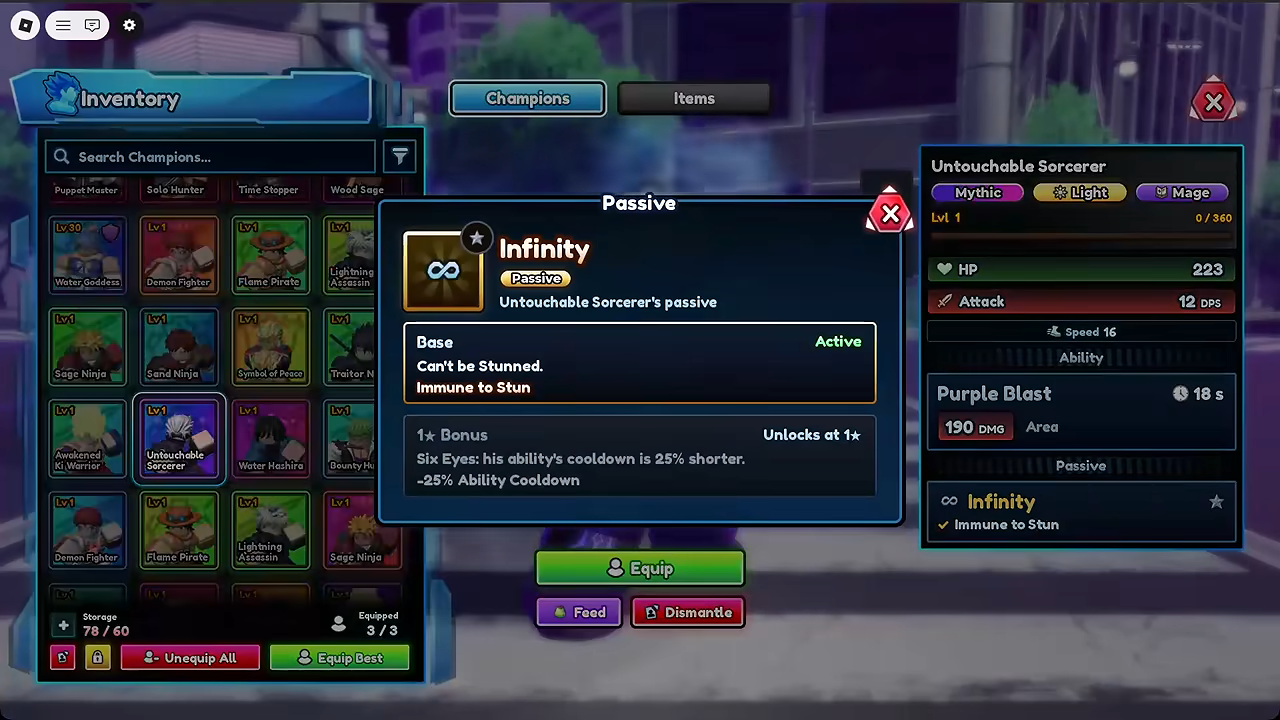
Press C to open the Inventory → Champions screen. Dismantle sits in the row of Champion action buttons — Equip, Feed, Dismantle, Equip Best — between Feed and Equip Best. That much is confirmed: the reveal footage never used the button, so what dismantling takes or gives back is not yet known.
- Your Champions appear as named cards on the Inventory → Champions screen.
- No selection flow, confirmation prompt or rewards have been shown yet, so read what the game displays before dismantling a Champion you care about.
Finding the Dismantle option
The Dismantle option is not buried in a submenu — it is one of the four Champion actions shown directly on the Inventory → Champions screen. Press C to open it: your Champion cards are listed by name, and your Champion storage appears as a capacity counter — 78 / 60 in the reveal footage. The row of Champion action buttons reads, left to right:
| Position | Button |
|---|---|
| 1st | Equip |
| 2nd | Feed |
| 3rd | Dismantle |
| 4th | Equip Best |
Dismantle sits third in that row, so its neighbors — Feed and Equip Best — make it easy to recognize. Each Champion is displayed as its own card, and the buttons act on those Champions. The footage did not demonstrate how a Champion is selected for dismantling, so the exact flow — which card the action will apply to, and what prompts appear — is something you will see when you use it in-game.
What is actually known about what Dismantle does
The honest answer: only that the button exists. The full Inventory → Champions screen was revealed in the Champions gameplay trailer on November 25, the day before Anime Champions X's 26 November 2026 release. The trailer showed the screen in detail — named Champion cards, the capacity counter, all four action buttons — but it never pressed Dismantle. No Champion was seen being chosen, no confirmation or result screen appeared, and no rewards were displayed.
That leaves these parts genuinely open:
- How a Champion is selected for dismantling.
- Whether the game asks you to confirm first.
- What the action consumes or returns, and whether the change can be undone.
Nothing available so far supports a more specific claim, so a precise reward amount or removal rule you may read elsewhere is not backed by anything that has actually been shown.
Using Dismantle carefully until more is known
Because the outcome is undocumented, a few low-cost habits are worth following on your first dismantles:
- The first time you use the button, do it on a Champion you can spare rather than a favorite, and watch exactly what the game does before and after. Once you have seen the result, you can judge how safe it is for rarer units.
- Check which button you are pressing. Dismantle sits directly beside Feed and Equip Best, so a slightly off click triggers a different action.
- If inventory space is on your mind, the capacity counter on the same screen shows how many Champions you hold against your limit — but nothing shown so far connects dismantling to freeing space, so do not count on it before you have seen it happen.
The Champions screen you are dismantling from
The Inventory → Champions screen is the same hub as the rest of your Champion management. The reveal footage showed 20 distinct Champion names, each on its own card, and a Champion's panel carries its stats — the Mythic Untouchable Sorcerer, for example, had its Passive Infinity and Purple Blast stats displayed. Tier names like Mythic are covered in the rarities guide.
Related pages
- Champion inventory — a closer look at the screen where Dismantle lives.
- Feeding — the action button next to Dismantle, covered on its own page.
- Champions list — the full roster of named Champions.
- Beginner guide — the basics of starting out.