
Anime Champions X Quests Guide: How to Find, Track and Complete Quests
Find, track and complete quests in Anime Champions X: the Quests menu (J key), the HUD quest tracker, NPC quest lines and the Gem rewards shown for each quest.
Quick answer
Official footage so far shows quests reaching you as story pop-ups, NPC quest lines and zone boss quests: story quests pop up automatically (the first one, Save the Scout, pops up right after you land on Blue Planet), NPC quest-givers hand out multi-part quest lines, and named zones carry boss quests. In official footage, your current objective is tracked on the right side of the HUD, the Quests button (key hint J) sits on the left side of the HUD, and quest windows display their reward before you complete anything.
- Story quest — Save the Scout (Quest 1 of 2, 200 Gems) pops up right after you land on Blue Planet.
- NPC quest line — Pirate Town's Treasure Hunter offers a treasure hunt; his first quest is The Torn Map (Quest 1 of 3, 300 Gems).
- Boss quest — Pirate Town's Pirate Captain's Crew asks you to defeat the Marine Captain.
- Tracking — in official footage, the right side of the HUD shows your active quest, and entering a zone brings up an objective banner.
Quests are how Anime Champions X points you at the next thing to do, and the game keeps them unusually visible: between the on-screen tracker, the zone banners and automatic pop-ups, you rarely have to go hunting for your objective. This guide covers where quests come from, where the Quests menu sits, how your active quest is tracked, and what completing the confirmed quests actually involves.
Where quests come from
Official footage so far shows quests arriving three ways, and all three forms show up in the opening stretch of play.
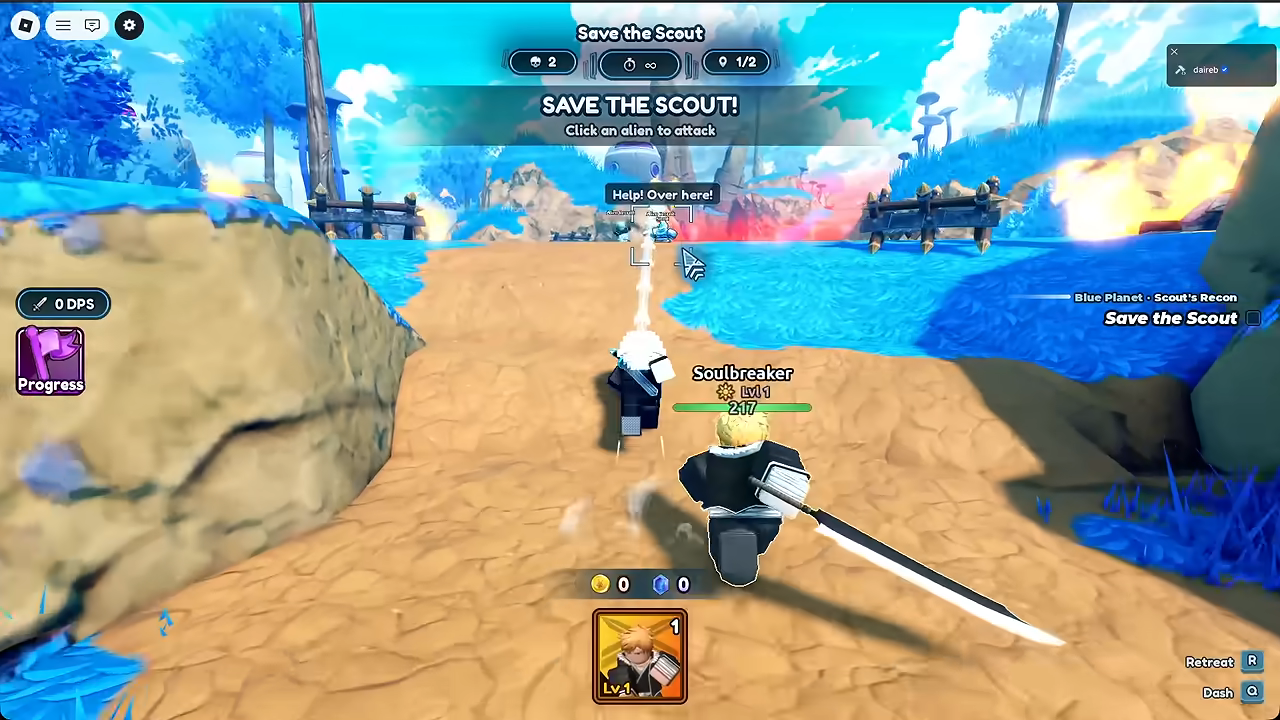
Story quests pop up on their own. The game's first quest, Save the Scout (Quest 1 of 2), appears right after you land on Blue Planet, with its 200 Gems reward already displayed in the quest window. It belongs to the Scout's Recon stage and sends you to rescue a trapped scout — our Scout's Recon quest guide walks through it step by step.
NPC quest-givers run their own quest lines. In Pirate Town, an NPC called the Treasure Hunter offers a treasure-hunt interaction. His line is multi-part: the first quest is Treasure Hunter — The Torn Map, Quest 1 of 3, listed at 300 Gems. That quest has its own page too, at the Torn Map quest guide.
Named zones carry boss quests. Pirate Town — the first area named in official footage — is tied to the boss quest Pirate Captain's Crew, whose objective reads “Defeat the Marine Captain”. That quest has its own page at the Pirate Captain's Crew quest guide, and boss fights in general are covered in the bosses guide.
Finding the Quests menu
As shown in official footage of the default HUD, the left side of the screen holds a row of six menu buttons: Play, Summon, Store, Quests, Travel and Inventory. The Quests button sits fourth in that row and carries the J key hint. For the other shortcuts dotted around the HUD, the controls guide pulls them together.
The menu is the explicit way in, but day to day you rarely need to open it — the game pins your current objective to the main screen, as the next section shows.
Tracking your active quest
Two HUD elements keep the current objective in view.
The right side of the HUD shows your current quest. In official footage, that slot displays the quest's zone and name — “Pirate Town · Pirate Captain's Crew” — with a Boss tag and the objective underneath: “Defeat the Marine Captain”. Glance there whenever you lose the thread.
Zone entrances announce the task. Walking into a zone brings up an objective banner naming the zone and what you are there to do: the Pirate Town entrance reads “Pirate Town - Pirate Captain's Crew: Defeat the Marine Captain”, and on Blue Planet the alien fight plays out under a “DEFEAT THE ALIENS!” banner.
Between the persistent tracker and the entrance banners, you can check what you are meant to be doing without opening any menu.
How quest objectives play out
Objectives are concrete, and the opening quest shows the full pattern:
Save the Scout — Blue Planet · Scout's Recon
- Land on Blue Planet. The quest window pops up on its own, showing the quest name, the Quest 1 of 2 marker and the 200 Gems reward.
- Walk to the trapped scout NPC — a “DEFEAT THE ALIENS!” banner hangs over the fight.
- Click an alien to attack. The on-screen prompt spells it out: “Save the Scout! Click an alien to attack”.
- Defeat the aliens surrounding the scout to complete the objective.
Boss quests scale the same idea up to one named target: Pirate Captain's Crew keeps “Defeat the Marine Captain” pinned in the tracker while you work through Pirate Town. NPC lines center on the quest-giver: the Treasure Hunter offers the treasure-hunt interaction, and his line opens with The Torn Map as part one of three.
Confirmed quests and rewards
Every quest shown in official material so far fits in one lookup:
| Quest | Zone / stage | Progress | Objective | Reward shown |
|---|---|---|---|---|
| Save the Scout | Blue Planet · Scout's Recon | Quest 1 of 2 | Defeat the aliens around the trapped scout | 200 Gems |
| Pirate Captain's Crew | Pirate Town | Boss quest | Defeat the Marine Captain | — |
| Treasure Hunter — The Torn Map | Pirate Town (Treasure Hunter NPC) | Quest 1 of 3 | Treasure hunt | 300 Gems |
Quest windows display their reward up front, and both observed rewards use Gems — the purple currency: 200 for Save the Scout, 300 for The Torn Map. The dash for Pirate Captain's Crew means no reward has been shown for it yet, not that the quest has none. The progress counters also hint at what is ahead: Scout's Recon counts toward a second quest, and the Treasure Hunter's line runs three parts deep. More on the currency itself in the Gems guide.
Quests in the wider game
Quests thread through the whole structure of Anime Champions X: the opening rescue on Blue Planet's Scout's Recon, the Treasure Hunter's treasure hunt and the Marine Captain fight in Pirate Town each pull you into a different corner of the game — fighting, exploring and following NPC lines. If you are just starting out, the beginner guide sets up those first sessions, and the worlds overview covers the zones the quests drop you into.